Learning how to improve AI-generated games starts with deciding which changes are worth making, not simply asking for more features. Zenva’s experience helping over 1,000,000 learners and developers gain digital skills informs this practical walkthrough: you’ll refine a Godot open-world prototype with Opus 5.5, test its terrain and biomes, and identify what still needs work.
This walkthrough assumes you have an AI-generated Godot prototype and Claude, Godot, and Blender already set up to work on it. AI-generated designs and fixes can vary, so adapt the feedback to your own project and test the results as you go.
If you’d like structured practice with game development and AI-assisted coding, explore Zenva Academy. You can keep following this free tutorial to work through the improvement process.
Table of contents
How to Improve AI-Generated Games: Decide What to Keep
Start by playing your prototype and asking what kind of game you actually want to spend time in. A game can run correctly and still offer little reason to keep playing.
For this planet-exploration project, the most appealing part is relaxed exploration, with calm movement and soothing audio. The initial No Man’s Sky-inspired design includes several planets, but one green planet is enough to support that experience. Keeping multiple planets is less important than making that one environment interesting.
The terrain is an obvious place to improve. A single layer of noise produces gentle, repetitive hills. There are trees and rocks to explore, but the landscape needs more variety.
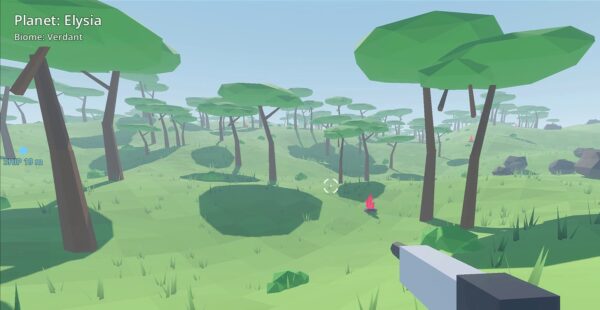
Define the experience you want before expanding the feature list. Here, the direction is calm exploration with tempting, dangerous areas: places that offer a reward but encourage you to get away quickly. Treat that as a design goal, not something the prototype already delivers.
Turn Your Ideas Into an Interactive Design Document
Describe your ideas in your own words, then turn them into a text document for Claude. You can speak your thoughts aloud and transcribe them with a local audio-transcription tool, or use another transcription option. The important part is capturing what you want to change.
With Opus 5.5 selected, give Claude that brief and ask it to create an interactive game design document. Review the proposed direction before asking it to implement the changes.
For this project, the document explores a single, finite planet where reaching one edge brings you back to the other side. The initial brief suggests a world roughly the size of Texas, although that scope is reduced later.
Make the Terrain More Varied
Ask for multiple stacked layers of noise rather than relying on the original single layer. The interactive document lets you explore octaves and other terrain parameters, including ridged mountains and domain warp.
It also proposes landmarks such as sinkholes, craters, arches, spires, and mesas, along with canyons you can fly through. Use the previews to review the kind of landscape you want.
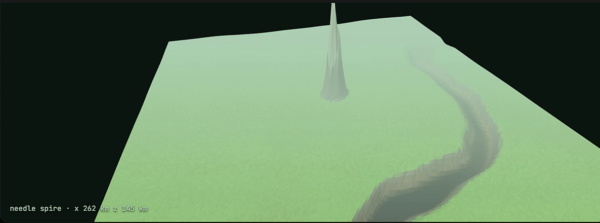
Caves and overhangs are another proposed direction, but they require a different terrain-generation approach. The corresponding preview does not appear to respond reliably here, so it is not evidence of a working cave system.
Keep Exploration Close to the Terrain
The design also considers different weather and biomes across the planet. To keep flight interesting, it proposes a constraint on flying too high: ionizing radiation, patrol sentinels, or a combination of the two.
The aim is to encourage low-altitude exploration instead of letting the player bypass the landscape. These are design proposals to evaluate, not a list of completed features.
Finally, review the implementation plan and the parts of the existing game that need to go. Moving to one planet means cleaning up the earlier multi-planet systems, not just adding new terrain features.
Implement the First Revision and Test It
Once the direction looks useful, ask Claude to go ahead with the changes and add terrain variations. The first substantial revision of this build takes around 45 minutes, with Claude working through Godot and Blender. Your own iteration time may differ.
Run the revised game and try to begin playing. The first launch here fails with a Godot parser error:
Cannot infer the type of "id" variable because the value doesn't have a set type.

If your build fails, copy the error message and send it to Claude, then test again after the change. This build needs another attempt before it runs, so don’t assume the first fix resolves every issue.
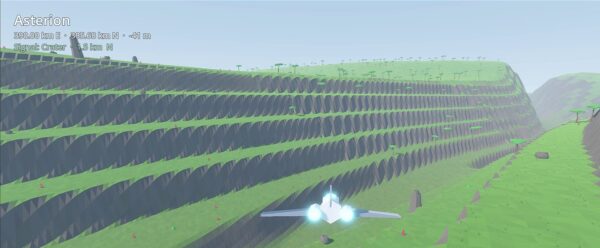
Once you can play, assess the result rather than judging it by the list of changes. The first revision adds distinctive terrain elements, but the broad landscape still feels barren, and there is a clipping issue with a distant mesa.
Flying through a canyon is a more promising result. It gives the terrain a feature worth exploring, even though the surrounding world still needs work.
Iterate on Terrain, Biomes, and World Size
For the next round, give Claude feedback on the specific parts of the playable build that bother you. Ask it to focus on code changes and address those issues rather than repeating the larger design exercise.
After a couple of iterations, this project has more varied terrain and clearer biome differences. One useful scope change is reducing the world to 10% of its initially proposed size while requesting more biome variety.
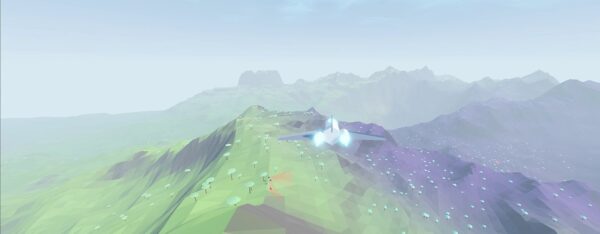
Work with two levels of variation. At the planet level, the design includes polar regions, large deserts, and tundra. At the smaller scale, request microclimates so that short flights through nearby areas do not all look the same.
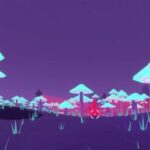
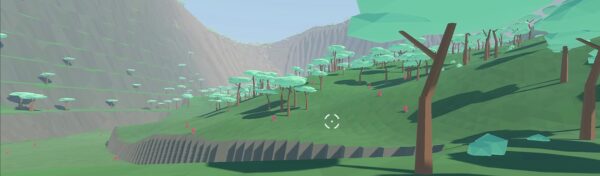
The revised terrain includes adjacent green and purple regions, and the on-foot view gives you another way to assess the landscape. Keep checking the game as the changes accumulate; better scenery is only one part of a more engaging experience.
Check Performance and AI Usage
More detailed terrain and vegetation bring performance considerations. In this build, trees are hidden during flight for performance reasons, and loading takes longer as the project grows. No frame drops are noticed during the playtest, but the longer loading time is already a reason to consider optimization.
Materials and shaders are among the areas suggested for future optimization. They are not optimized as part of this walkthrough, so treat that as further work rather than a completed step.
Check your Claude usage too. This round of work takes place within one session and uses 78% of that session’s allowance and 11% of the weekly allowance shown in the account.
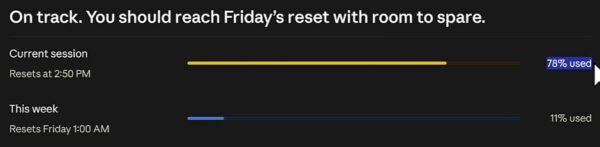
Those figures describe this particular run. They are not a dollar-cost estimate or a promise about the usage your own iterations will require.
Recognize What the Prototype Still Needs
The exploration is more interesting now, but the game still lacks an engaging game loop and a sense of progression. Improved terrain and more biomes do not automatically solve that problem.
Waiting for the AI to make each revision is another limitation. Knowing how to work directly in the Godot project and its code lets you make changes quickly and guide Claude more precisely. Understanding procedural generation also helps you describe the terrain you want rather than relying entirely on the AI’s interpretation.
Keep Improving With Clear Feedback
You now have a practical way to refine an AI-generated exploration prototype without treating each new version as a finished game:
- Choose the experience worth keeping and narrow the project’s scope around it.
- Review an interactive design document before approving implementation.
- Test launch errors and gameplay, then give feedback on specific problems.
- Refine terrain, biomes, and world size while checking performance and usage.
- Separate visual improvements from the game loop and progression still needed.
Use what you learn from each playtest to choose the next change, and build your Godot skills so you can make adjustments yourself when waiting on another AI iteration slows you down.
Ready to develop those skills with a guided path? Explore Zenva Academy for structured game-development and AI-coding learning you can apply to your own projects.
Did you come across any errors in this tutorial? Please let us know by completing this form and we’ll look into it!
FINAL DAYS: Unlock coding courses in Unity, Godot, Unreal, Python and more.