Heavy calculations can bring a Godot game to a standstill. When procedural generation, pathfinding, or data parsing runs on the main thread, rendering and input have to wait their turn, and players feel it as stutters or a frozen frame. Godot multithreading solves this by moving expensive work onto background threads, and in this tutorial you’ll learn how to do it safely by building a benchmark that measures the difference for yourself.
This tutorial is adapted from Zenva’s structured game development training, which has helped a community of over 1,000,000 learners and developers gain digital skills through courses, interactive apps, eBooks, and technical tutorials. You’ll follow the same guided approach here: first the theory and thread-safety rules, then a hands-on test with real numbers.
Before starting, make sure you have Godot installed and are comfortable with the basics, such as creating scenes and attaching scripts.
https://youtu.be/68Rn-EfJlio
Download Project Files
The files and the full project are available through the course included in the Intermediate Godot Mini-Degree if you’d like to follow along with the completed project.

Godot Multithreading: Sequential and Parallel Execution
Code normally runs sequentially: each operation finishes before the next one begins, much like following a recipe one step at a time. Multithreading divides work into separate threads that can execute simultaneously across multiple CPU cores.
That is valuable for expensive calculations or large amounts of data. Moving work away from the main thread prevents rendering, input processing, and other visible gameplay from pausing while those calculations finish. Common background tasks include procedural generation during a loading screen, parsing downloaded data, streaming resources, and calculating AI navigation paths.
Understanding Thread Safety
Parallel execution is not suitable for every operation. Multiple threads interacting with the same engine state can create errors, inconsistent data, or crashes. In particular, Godot’s scene tree is not thread safe and should not be accessed or modified directly from a background thread.
Generally Safe Operations
- Accessing singletons and autoload data
- Using NavigationServer features designed for background path calculations
- Loading resources without modifying them
Operations to Avoid
- Adding, removing, or changing Nodes in the scene tree
- Most rendering and physics operations
- Modifying shared resources
Godot settings can enable some rendering-server and physics-server work from additional threads, but these advanced options should be used only when their synchronization requirements are fully understood.
Using the Thread Class
The Thread class runs a function on a dedicated thread until that function returns. It gives you direct control over the thread lifecycle and works well for a continuous background process, such as listening for network packets.
That control also creates responsibility. Your game must signal the process to stop and wait for the thread to finish when its owning Node exits. Missing cleanup can leave work running indefinitely and cause crashes or thread leaks.
Using WorkerThreadPool
WorkerThreadPool is a singleton that manages a set of worker threads for you. Godot handles starting and stopping those threads, which makes this approach well suited to batch processing.
A group task receives a function and an iteration count. The pool invokes that function for each index, allowing a large array of independent items to be processed in parallel. For example, one group task could calculate updated paths for many enemies, with each invocation using its index to select an enemy.
The task returns an identifier that can be used to wait for group completion. This provides less lifecycle control than a raw Thread, but it requires much less manual management.
Choosing an Approach
Use a dedicated Thread when a specific long-running process needs explicit lifecycle control. For most parallel game-development workloads, especially repetitive data processing, WorkerThreadPool is the recommended starting point.
With the theory covered, it’s time to see the difference in practice. You’ll build a benchmark that processes an intentionally expensive operation sequentially, then process the same input with WorkerThreadPool so the two timings can be compared fairly.
Preparing the Benchmark Scene
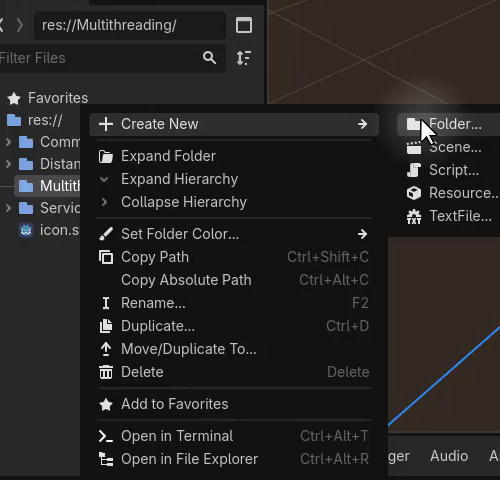
Start by creating a Multithreading folder with Scenes and Scripts subfolders. Add a simple Main scene containing a Node named Multithreading, then save the scene in Multithreading/Scenes.
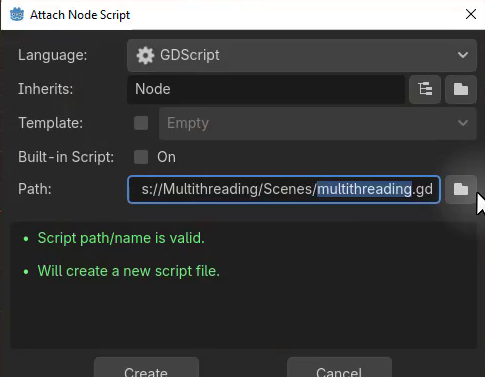
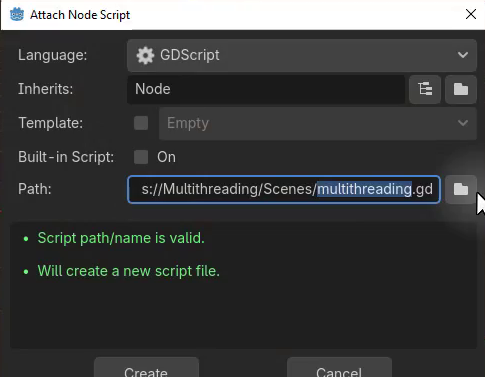
Attach a new script named multithreading_test.gd and save it in Multithreading/Scripts.
Defining the Workload
Next, configure how many values the benchmark will process and how much work each value requires. Packed arrays store the input and both result sets with a compact memory layout:
const ITERATION_COUNT = 50
const WORK_PER_ITERATION = 100000

var data : PackedFloat64Array
var results_sequential : PackedFloat64Array
var results_threaded : PackedFloat64Array
Set up the input data by resizing each array and filling data with random values between 0 and 10,000:
func _setup_data ():
	data.resize(ITERATION_COUNT)

	for i in ITERATION_COUNT:
		data[i] = randf() * 10000.0

	results_sequential.resize(ITERATION_COUNT)
	results_threaded.resize(ITERATION_COUNT)
Creating an Expensive Operation
The benchmark needs enough CPU work to produce a visible timing difference. Repeated sine, cosine, and square-root calculations provide an intentionally heavy operation:
func _expensive_operation (value : float) -> float:
	for i in WORK_PER_ITERATION:
		value = sin(value) * cos(value) + sqrt(value)

	return value
Each of the 50 input values runs through this calculation 100,000 times.
Running the Sequential Test
Record the start time in milliseconds, process each value one after another, and subtract the start time from the final clock value:
func _run_sequential ():
	var start_time : int = Time.get_ticks_msec()

	for i in ITERATION_COUNT:
		results_sequential[i] = _expensive_operation(data[i])

	var elapsed_time : int = Time.get_ticks_msec() - start_time
	print(str("Sequential time: ", elapsed_time, "ms"))
Call the setup and sequential functions when the Node becomes ready:
func _ready ():
	_setup_data()
	_run_sequential()
Reading the Result
Run the scene and inspect Godot’s Output panel. The example run completed in approximately 563 milliseconds, although the exact value depends on the computer.

Because every operation runs on the main thread, the game remains blocked until the benchmark finishes. Keep that number in mind, because the threaded version will process the same input next.
Submitting a Group Task
Create _run_threaded() with the same timing structure used by the sequential test. Submit a group task by passing the worker function and the number of elements to process:
func _run_threaded ():
	var start_time : int = Time.get_ticks_msec()

	var task_id : int = WorkerThreadPool.add_group_task(_threaded_task, ITERATION_COUNT)
	WorkerThreadPool.wait_for_group_task_completion(task_id)

	var elapsed_time : int = Time.get_ticks_msec() - start_time
	print(str("Threaded time: ", elapsed_time, "ms"))
add_group_task() schedules _threaded_task() once for every index from zero to ITERATION_COUNT minus one. The returned task ID identifies this batch and is passed to wait_for_group_task_completion() to synchronize before measuring the final time.
Processing Each Index
The worker function receives the automatically assigned index. Use it to read one input value and write the corresponding threaded result:
func _threaded_task (index : int):
	results_threaded[index] = _expensive_operation(data[index])
Each invocation performs the same expensive calculation used by the sequential test, but WorkerThreadPool can distribute independent iterations across multiple workers.
Running Both Tests
Call the threaded benchmark immediately after the sequential benchmark so both use the same prepared data and workload:
func _ready ():
	_setup_data()
	_run_sequential()
	_run_threaded()
The comparison frame recorded a sequential time of 562 milliseconds and a threaded time of 309 milliseconds. Exact timings vary by processor and system load, but the same operation completed faster when distributed across workers.

Applying WorkerThreadPool Appropriately
Parallel workers are useful for large batches of independent data, such as recalculating paths for many enemies. They are not a universal performance switch. Background tasks must avoid unsafe scene-tree access, resource modification, and unsupported rendering or physics operations.
Choose multithreading when a workload can be separated into independent, thread-safe calculations. Keeping those calculations away from the main thread can reduce gameplay stutters while preserving responsive rendering and input.
Conclusion
You now have a working benchmark that shows multithreading in action. Along the way, you covered:
- How multithreading divides work across CPU cores
- Which Godot operations are safe from background threads
- When to choose a Thread versus WorkerThreadPool
- How to submit a group task and wait for its completion
- How to measure and compare sequential and threaded timings
From here, you can apply the same pattern to your own expensive workloads, such as pathfinding or procedural generation, and keep your game responsive while they run.
If you want to keep building your Godot skills with a structured, project-based path, the Intermediate Godot Mini-Degree covers this topic and other intermediate Godot techniques in depth.
Did you come across any errors in this tutorial? Please let us know by completing this form and we’ll look into it!
FINAL DAYS: Unlock coding courses in Unity, Godot, Unreal, Python and more.